

Universal Ceiling Fan Remote Control Kit, Replacement for Harbor Breeze, Hampton Bay, Hunter, w/Receiver FAN28R Light Dimmer, Replace L3HFAN35T1 FAN-35T1 L3HFAN35T FAN-35T KUJCE9603 UC7202T CHQ7202T
Product details
| Management number | 208371531 | Release Date | 2026/03/22 | List Price | $16.00 | Model Number | 208371531 | ||
|---|---|---|---|---|---|---|---|---|---|
| Category | |||||||||
This ceiling fan remote control kit works most major 110V 3-speed AC ceiling fans, compatible with Harbor Breeze, Allen Roth, Kichler, Hunter, Hampton Bay and other brands.3-Speed (High/Medium/Low) and OFF for ceiling fan.Black button for light.Black button on the remote control can be used to turn the lights on and off and dimmable. In the case of dimmable lights, press and hold the green button to adjust the brightness of the fan light. The light dimmer works well with some dimmable CFL/LED lights and all incandescent lamps. Most LED/CFL lights are non-dimmable, and the remote only control ON/OFF function in this case.How to set DIP codes: 1.Look the DIP Codes inside the old remote with the battery cover off, the DIP Switches hidden behind the slot for the battery as picture shows 2.Slide the switches in the new remote to match the same pattern as the original remote. 3.Replace the battery in the new remote and things should work. 4.If the original remote control code is not visible, you will need to open the ceiling fan cover to see the receiver code. Then slide the switch in the new remote to match the same mode as the receiver B.If your receiver is FAN30R, do not need to set the codes on the receiver. Please use LEARN button to match the transmitter and receiver. NOTICE ! Your ceiling fan and light kit assembly must meet the following requirements: 1. Do not use with solid state fans. 2. Electrical rating: 120v 60Hz 3.5A MAX. Motor amps: 1.0 MAX. Light watts: 240-(incandescent or ballast non-dimmer)OUR SERVICE -30-day money-back guarantee for any reason; 12-month warranty for quality-related issues. If there are any problems with the purchase, please feel free to contact us, we will help to fix the problem.
- 【Harbor Breeze Replacement Remote】This 35t ceiling fan remote control is a great replacement for Harbor Breeze, Allen+Roth, Kichler ceiling fans.
- 【Ceiling Fan Receiver Universal 】This ceiling fan remote control kit have a durable black receiver, the rated power of the receiver is 240W. Frequency: 303.9.This ceiling fan receiver uses 2 upgraded relays, with the new component the dimming function of the relay is better than the thyristor.
- 【Harbor Breeze Remote Control with Light Dimmer 】3-Speed (High/Medium/Low) and OFF for ceiling fan.Black button for light.Black button on the remote control can be used to turn the lights on and off and dimmable. In the case of dimmable lights, press and hold the button to adjust the brightness of the fan light. The light dimmer works well with some dimmable CFL/LED lights and all incandescent lamps.
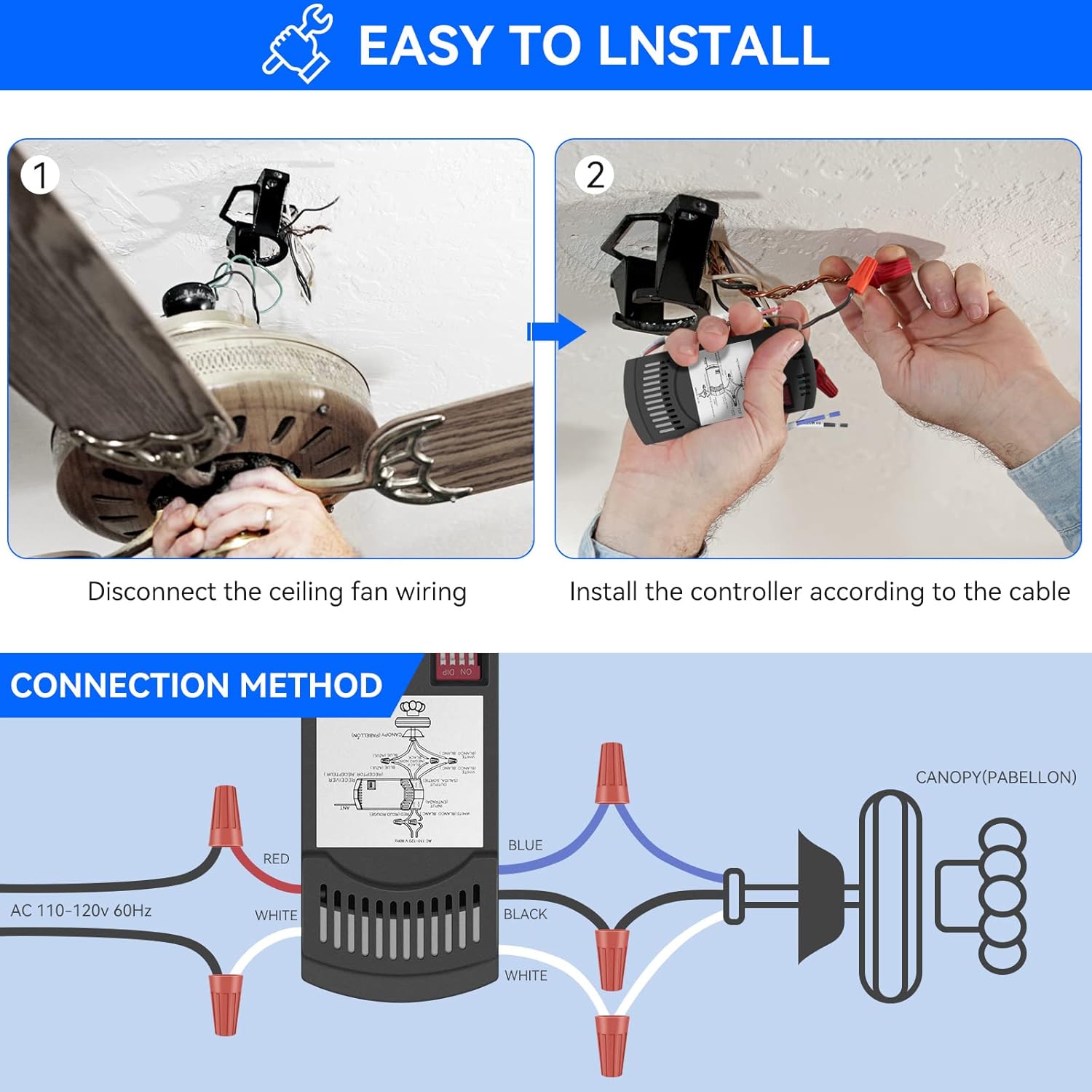
- 【 Easy to Install and Use】The receiver wires are labelled, and the wires all have the correct color codes. Matching dip switch for the transmitter and receiver: Look inside the old remote with the battery cover off. There is a series of " DIP" switches(4) with a pen, slide the switches in the new remote to match the same pattern as the old remote. Replace the battery in the new remote and things should work well.
- 【Note】 Please NOTE that this remote does not have the Reverse button. If your ceiling fan have PULL CHAINS SWITCH, before using the remote control, use the PULL CHAINS SWITCH to turn the wind speed to maximum and turn the fan light on. Only in this way can the PULL CHAINS SWITCH and remote control be used together. The remote control requires a 9V battery for work(NOT INCLUDED).
| Item model number | FAN28R |
|---|



Bestseller ranking
Mounting Brackets

Customers who viewed this product also viewed
Remote Controls



Correction of product information
If you notice any omissions or errors in the product information on this page, please use the correction request form below.
Correction Request Form